
Whether you are working a high stakes emergency night shift or managing routine morning samples, laboratory work demands flawless precision under pressure. Calculations take time, counters require concentration, and tracking multiple things at once can invite transcription risks.
That is why I built the Only Cells Laboratory Toolkit, a standalone, distraction-free web application designed by a Biomedical Scientist, specifically for the reality of live bench work.
Designed for desktop, optimised for the mobile:
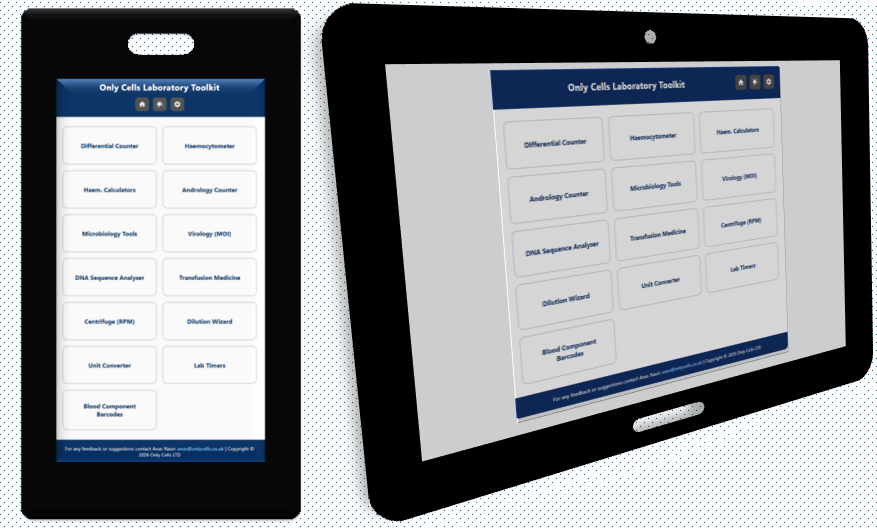
It is well known that lab real estate is precious. This toolkit adapts beautifully to whatever terminal or device you have at hand:
- On desktops: Keep it open side by side with your LIMS. It supports full mechanical keyboard hotkeys, meaning you can run rapid fire cell counts entirely via muscle memory without taking your eyes off the microscope eyepieces.
- On mobile and tablets: Want it right next to your clean workspace or safety cabinet? It is fully touch optimised with spacious, responsive tap-cards.
- Run it offline: Because it compiles cleanly into a single, ultra-lightweight file, you can download it directly to your phone or PC. It requires zero installation, uses no data background data, and functions beautifully even inside the deepest, signal-shielded basement labs.
A true laboratory Swiss army knife
Every discipline has unique bottlenecks. This toolkit packages them into dedicated, swappable blocks that you can rearrange or toggle in your global settings menu based on your department.
Haematology & Transfusion Medicine
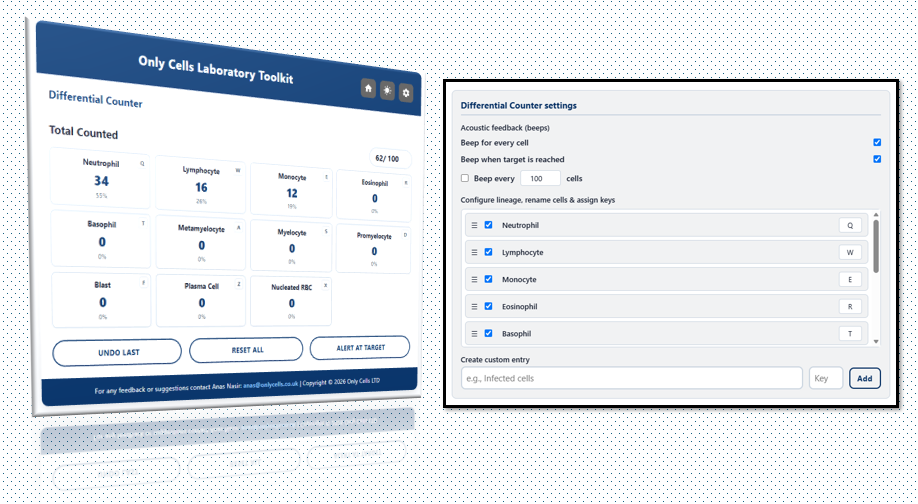
- Differential Counter: Isolated away from noisy UI distractions, our counter lets you log full 100-cell differentials with hotkey shortcuts. It features a built-in “Undo Last” button to correct misclicks instantly without starting over. You can also create your own cells, change hotkeys and rearrange them as you see fit. So whether you’re performing a diff using a keyboard or on your phone, both inputs work seamlessly.
- Haem. Calculators: Includes rapid diagnostic math utilities like Corrected WBC Counts (adjusting automatically for nucleated red blood cells (nRBC / 100 WBC)) and the Reticulocyte Production Index (RPI), which applies automated maturation factors based on the patient’s Hematocrit.
- Blood Component Compatibility Matrix: Built carefully to mirror British Society for Haematology (BSH) standards, this lookup engine lets you choose a patient’s exact phenotype (e.g., O RhD Negative or AB RhD Positive) to instantly verify matching choice preferences for Red Cells, Plasma (FFP), and Platelets.
- Rh Phenotype Translator: A flexible, bidirectional translator between Fisher-Race and Wiener nomenclatures (R1, R2, R0, r, etc.) to ease serology checks and rule out genotype transcription slip-ups.
- Fetal Maternal Haemorrhage (FMH) Calculator: Input your Kleihauer fetal to adult cell counts to safely approximate fetal bleed volumes (mL) and instantly determine the minimum standard prophylactic Anti-D Immunoglobulin dose required. The tool provides educational notes based on current UK guidance.
Microbiology & Virology
- Zone of Inhibition Interpreter: An interactive audit table mapped directly to EUCAST v16.1 guidelines. Input your disk diffusion diameters (mm) to view immediate clinical interpretations (S, I, R) alongside explicit MIC Breakpoint cut-offs (mg/L) and standard or high-exposure therapeutic dosage frameworks.
- Inducible Clindamycin Resistance (D-Test) Checker: Log adjacent disk results (Erythromycin and Clindamycin) to systematically record and flag zone blunting or blunted “D-shape” phenotypes.
- Oligo Resuspension Calculator: Simplifies master-mix prep by calculating the precise volume of diluent required to reconstitute lyophilised oligonucleotide primers (nmol) into target molar concentrations (μM).
- CFU/mL Plating Calculator: Back-calculate microbial growth density smoothly across varied dilution factors and plating volumes into clear exponential expressions.
- Virology (MOI) Calculator: Effortlessly configure required virus volumes for your infections based on target Multiplicity of Infection (MOI) models, fluid volumes, and active viral stock titres (PFU/mL).
DNA sequence analyser:
- Phase 1 & Phase 2 Profiling: Paste raw sequence strings or FASTA files directly. The tool automatically cleans out text headers and whitespace metadata, presenting total base-pair length, exact GC%, and Salt-Adjusted Wallace Melting Temperatures (Tm).
- Nucleotide Frequency & Codon Mapping: View clean histograms tracking the precise percentage breakdown of A, T, C, G along with automated, scanning counts of potential start (ATG) and stop (TAA, TAG, TGA) codons.
General bench utilities:
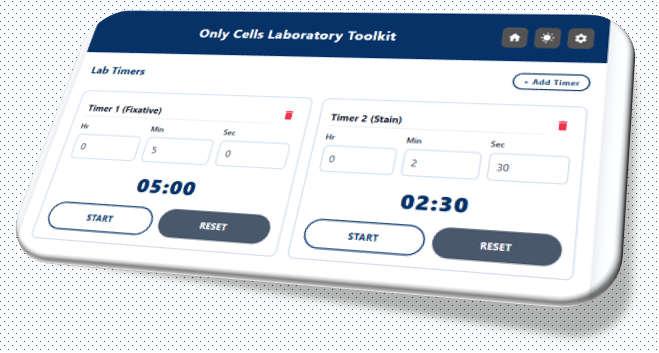
- Lab Timers Stack: A multi-timer stack that continues running dynamically in the background even if you exit back to the home menu. Features optional, configurable acoustic pre-alerts and interval chime reminders so you never forget an incubation or step timeline.
- Centrifuge (RPM) Converter: Convert dynamically between RPM (Revolutions Per Minute) and RCF (relative centrifugal force / g-force) based on the exact radius of your rotor bucket.
- Dilution Wizard & Unit Converter: Seamlessly handles multi-unit fluid calculations and conversions (including weight, volume, and metric/imperial variations) for complex reagent preparation.
- Blood Component Barcodes: A direct-pass home shortcut tile mapped to standard barcode assets to assist with rapid verification training and LIMS system simulations.
Built with security first:
As a single-page client-side web application, no data ever leaves your screen. Every sequence pasted, cell counted, or patient match calculated is processed entirely locally inside your browser cache memory. It complies strictly with strict data protection guidelines, keeping data completely isolated on your safe workstation terminal.
Help us build the future of the bench:
This toolkit belongs to the laboratory community. We will be expanding it continuously with automated state-retention, batch processing, and cell indices tracking.
Try it out on your next shift, see how it fits your workflow, and let us know what updates or calculators your department needs next.
Click the link below to load it on your browser, or save the standalone file locally on your desktop, or even your phone’s home screen for instant, touch-optimised bench access.
DOWNLOAD THE ONLY CELLS LABORATORY TOOLKIT HERE
For any feedback, feature requests, or custom laboratory module designs, contact me directly at anas@onlycells.co.uk.
Disclaimer: This toolkit is intended to support trained laboratory professionals. It provides calculation and decision-support functions and should be used in conjunction with local SOPs, validated laboratory procedures and current national guidelines. Final clinical interpretation remains the responsibility of the reporting laboratory.