
This tool allows you to generate blood component barcodes on an image that can then be used for training, either scanning directly on the screen or by downloading the generated image.
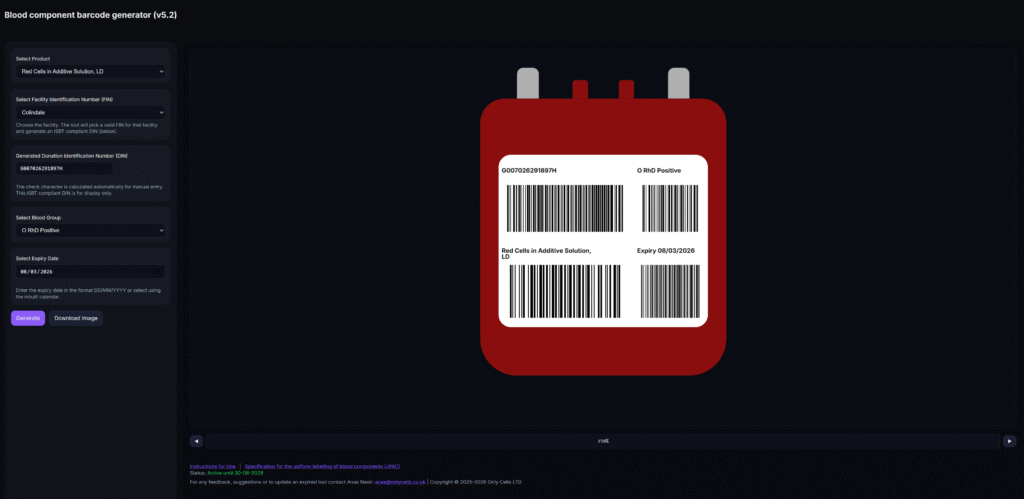
Steps to use the tool:
- Using the drop-down menu, select the required blood component from the list. The list contains all components included in the NHSBT Portfolio of Blood Components.
- Select the Facility from the drop dropdown list.1
- Select the blood group from the dedicated drop-down menu.
- Enter an expiry date of the component. The accepted format is DD/MM/YYYY, or you may use the inbuilt calendar function.
- Press the ‘Generate’ button. The tool will autogenerate an ISBT 128 compliant Donation Identification Number (DIN) and the image on the right-hand side of the screen will update immediately, displaying the corresponding component label and barcodes based on your selections.
- The generated image can then be scanned directly on the screen or downloaded for insertion into documentation or printing. To make the image bigger, use the zoom buttons under the image.
DOWNLOAD NHSBT BLOOD COMPONENT BARCODE GENERATOR TOOL HERE
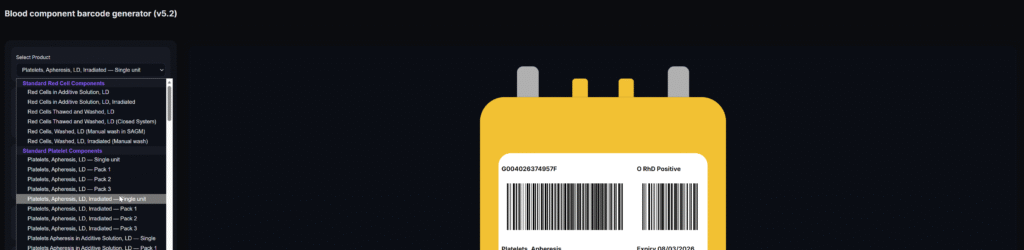
Version history and updates:
| Version number | Updates / notes |
| 5.2: NHSBT Blood component barcode generator full | Updated check digit calculation and barcode generation to fully meet ISBT-128 requirements |
| 5.1: NHSBT Blood component barcode generator full | Updated full NHSBT component list and organised by grouping together similar components. |
_____
1 A UK Facility Identification list can be found here (Appendix 8, page 90).
One Comment